
/
Monetization data
/
Subscription and in-app
/
Apphud
How to Integrate Apphud Webhooks with Campaignswell
Step 1. Open Apphud
Log in to your Apphud dashboard
Step 2. Go to the Integrations Section
- In the left-side menu, click "Integrations"
- Then select “S2S Webhooks”
Step 3. Add a New Webhook
- Click “New Webhook”
- Paste the Webhook URL provided in the Campaignswell integration manual
- Save the webhook

How to integrate Apphud transaction history with CW
Step 4. Set Up Amazon S3 ETL
- In Apphud, go to Integrations Page
- Find Amazon S3 ETL and click “Add Integration”

Step 5. Enter Your Credentials
Fill in all fields using the credentials provided earlier in the setup process
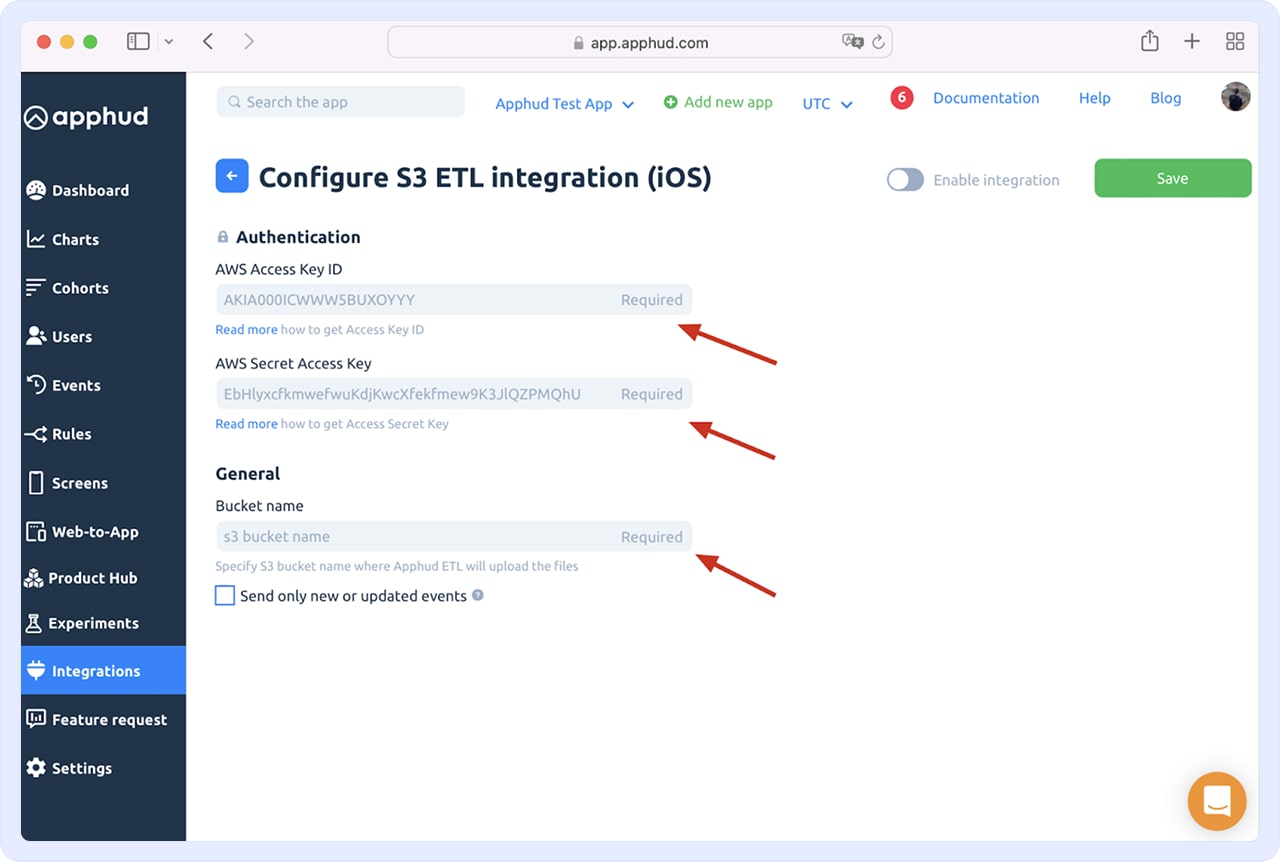
Step 6. Uncheck the Checkbox
Important: Make sure the checkbox labeled “send only new or update events" remains unchecked

Step 7. Enable and Save
- Enable the integration
- Click “Save”
